⭐ Cosmos DB 생성
1) Azure Portal Marketplace에서 Azure Cosmos DB를 찾아 "만들기"를 클릭한다.
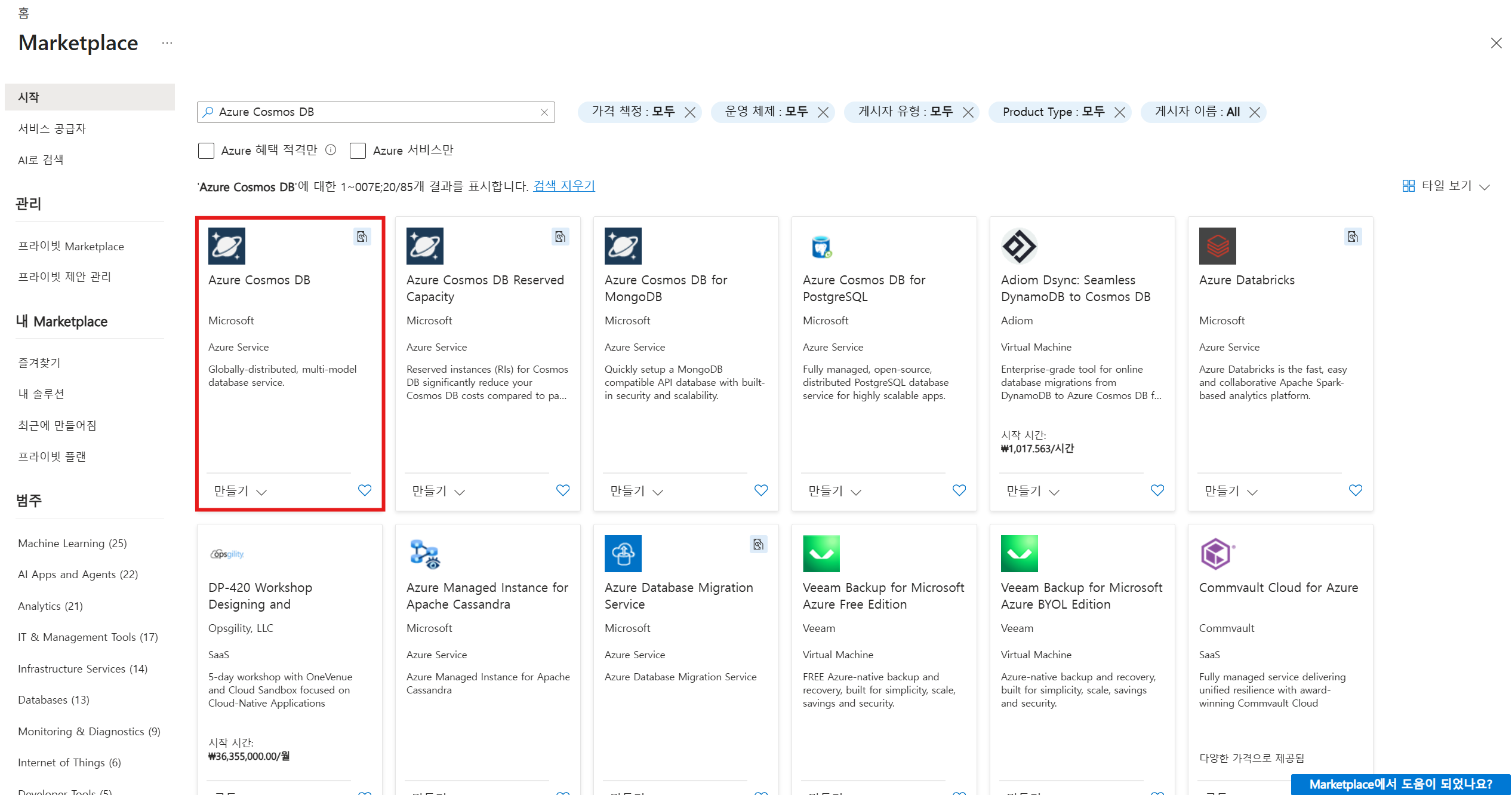
2) Azure Cosmos DB for NoSQL에서 "만들기"를 클릭한다.

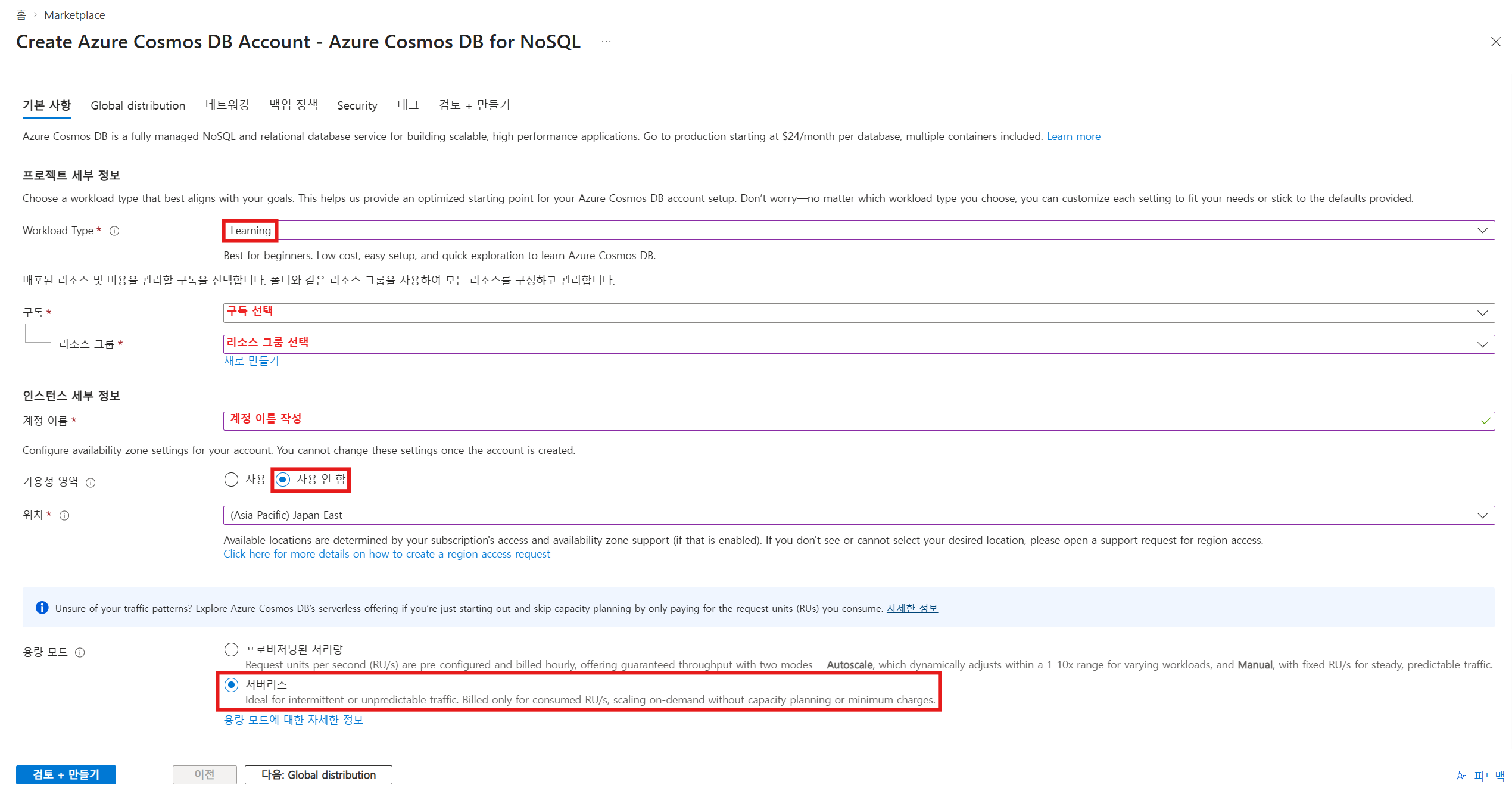
3) Cosmos DB의 기본 사항을 입력한다.
* 서버리스: 사용량 기준 청구
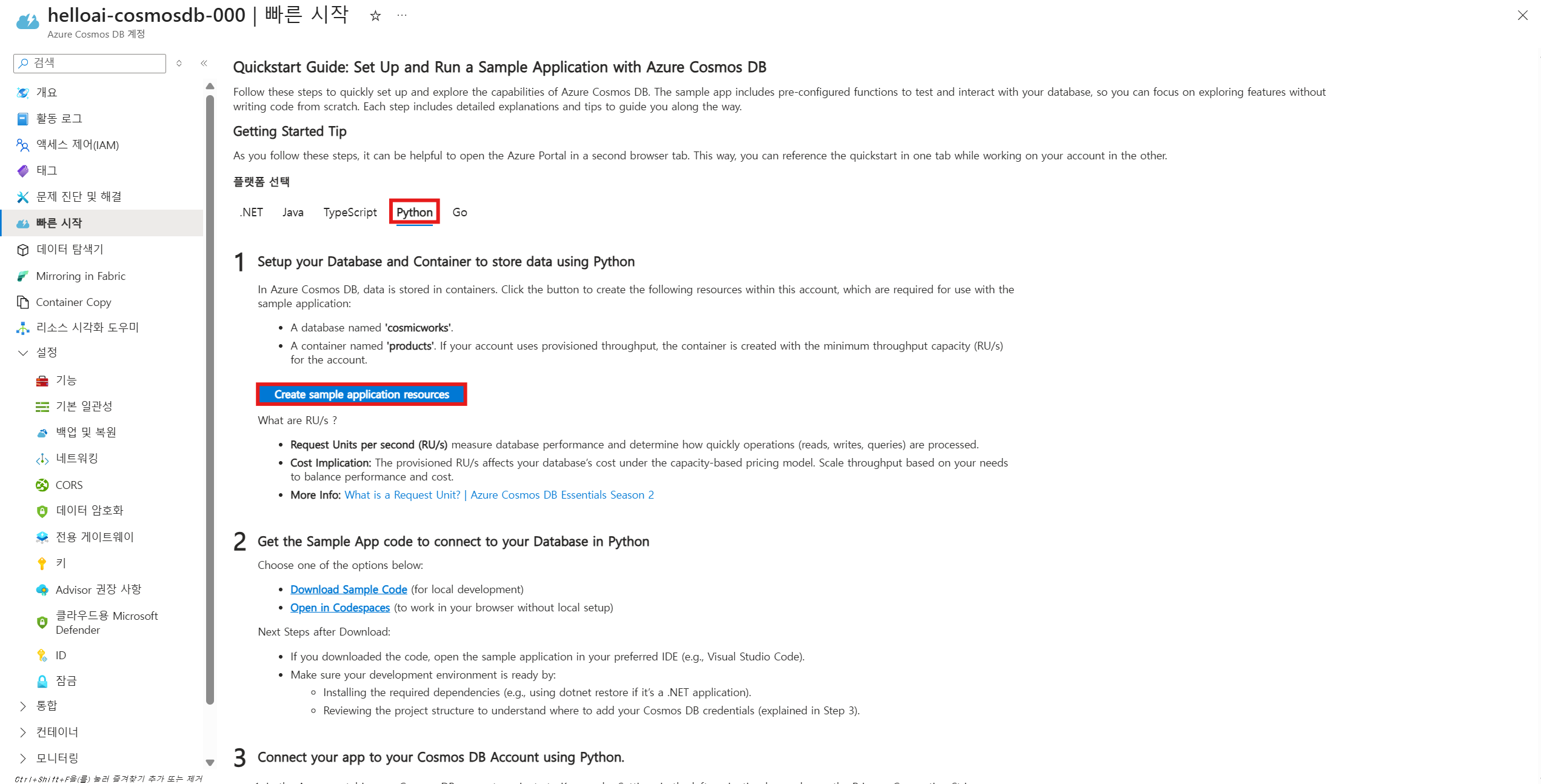
4) 생성된 리소스로 이동하여 "빠른 시작"에서 Python 플랫폼을 선택한 후,
"Create sample application resources"를 클릭한다.
Cosmos DB에서 실제 데이터는 컨테이너(Container) 내부에 저장된다.
따라서 계정을 생성한 이후에는 데이터베이스와 컨테이너를 직접 생성해야 한다.
다만, “빠른 시작” 기능을 활용하면 데이터베이스와 컨테이너가 자동으로 생성되어 바로 실습이 가능하다.

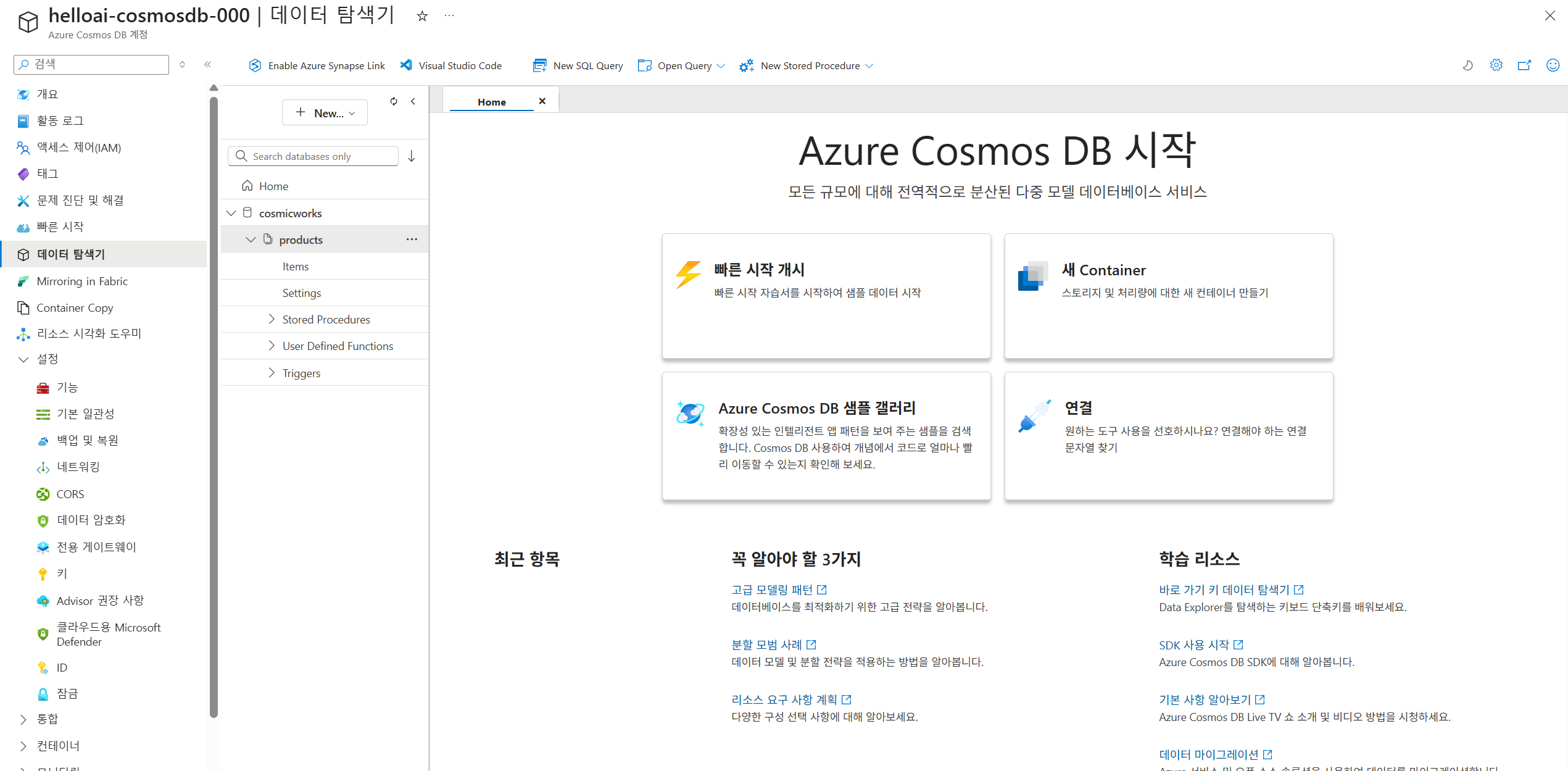
5) "데이터 탐색기"에서 새로 생성된 컨테이너를 확인한다.

⭐ Cosmos DB 데이터 저장 및 조회
1) 터미널에서 SSH로 가상머신에 접속한 후, pip install azure-cosmos 명령어를 실행하여
Cosmos DB 연결에 필요한 라이브러리를 설치한다.

2) vi cosmos-db-sample.py 명령어를 사용하여 Cosmos DB 실습을 위한 Python 파일을 생성한다.

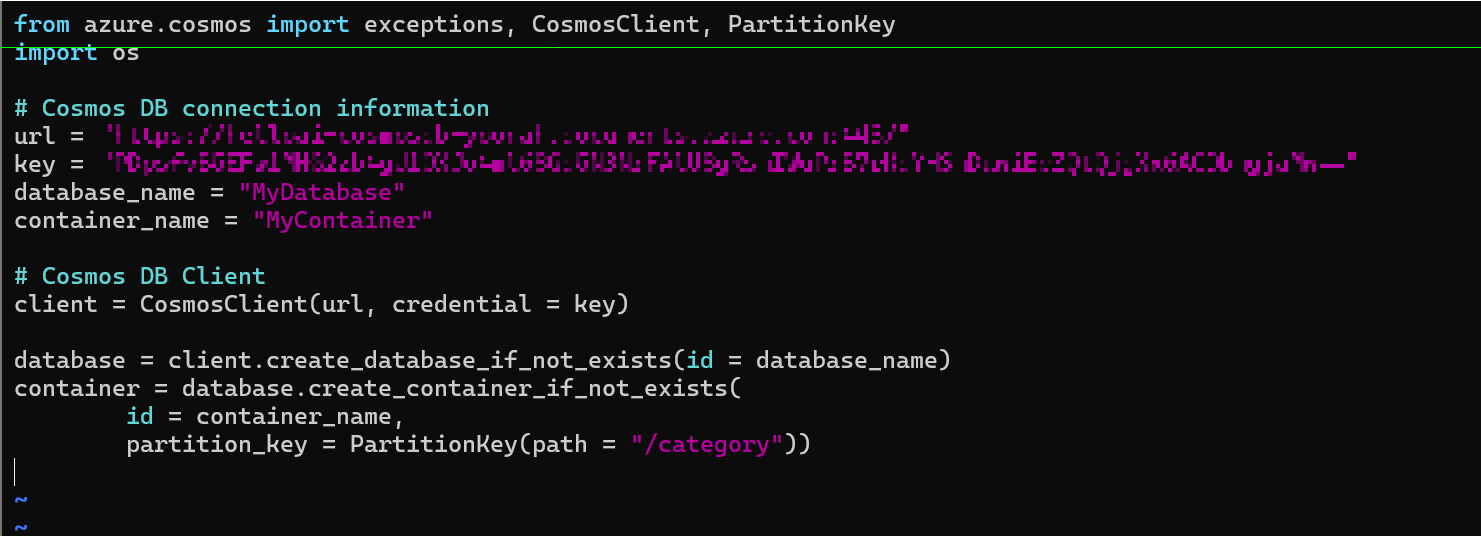
3) Cosmos DB에 연결하고 데이터베이스 및 컨테이너를 생성하는 코드를 작성한다.
코드를 저장한 후, 새로운 터미널 창에서 실행하여 정상적으로 동작하는지 확인한다.
from azure.cosmos import exceptions, CosmosClient, PartitionKey
import os

# Cosmos DB connection information
url = "[cosmos db의 엔드포인트 주소]"
key = "[cosmos db의 primary key]"
database_name = "MyDatabase"
container_name = "MyContainer"

# Cosmos DB Client
client = CosmosClient(url, credential = key)

database = client.create_database_if_not_exists(id = database_name)
container = database.create_container_if_not_exists(
        id = container_name,
        partition_key = PartitionKey(path = "/category"))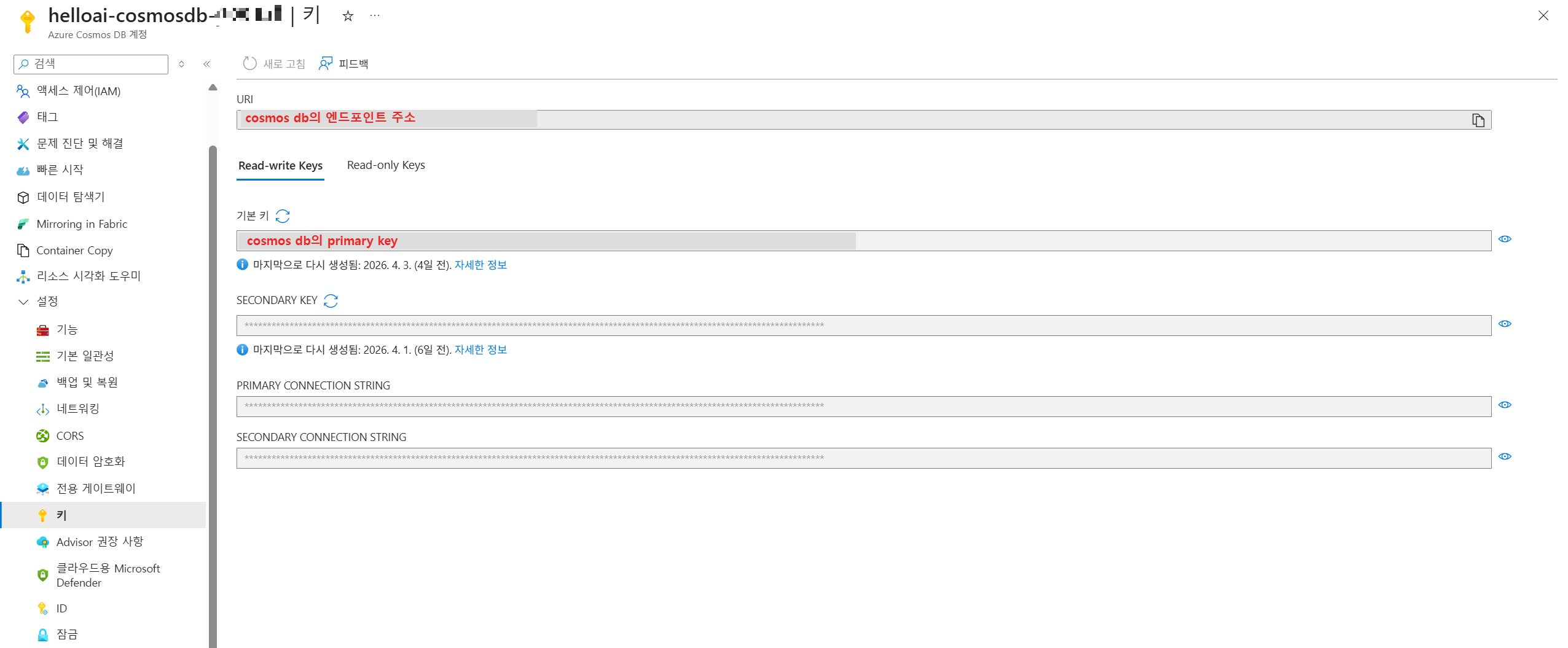


4) 데이터를 저장하는 insert_data() 함수와
데이터를 조회하는 query_data() 함수를 작성하여 코드를 완성한다.
from azure.cosmos import exceptions, CosmosClient, PartitionKey
import os

# Cosmos DB connection information
url = "[cosmos db의 엔드포인트 주소]"
key = "[cosmos db의 primary key]"
database_name = "MyDatabase"
container_name = "MyContainer"

# Cosmos DB Client
client = CosmosClient(url, credential = key)

database = client.create_database_if_not_exists(id = database_name)
container = database.create_container_if_not_exists(
        id = container_name,
        partition_key = PartitionKey(path = "/category"))

def insert_data():
    item = {
            "id" : "1",
            "category" : "Technology",
            "name" : "Azure Cosmos DB",
            "description" : "A globally distributed, multi modal database service"
            }

    container.upsert_item(item)
    print(f"Item with id {item['id']} inserted of updated")

def query_date():
    query = "SELECT * FROM c WHERE c.category = 'Technology'"
    items = container.query_items(query = query)

    for item in items:
        print(f"Item ID {item['id']}, Name: {item['name']}, Description {item['description']}")

insert_data()
query_date()


전체 코드 설명
더보기
# Azure Cosmos DB와 연결하기 위한 라이브러리 import
from azure.cosmos import exceptions, CosmosClient, PartitionKey
import os

# ==============================
# 1. Cosmos DB 연결 정보 설정
# ==============================

# Azure Portal에서 확인 가능한 엔드포인트 URL
url = "[Cosmos DB의 엔드포인트 주소]"

# Azure Portal에서 확인 가능한 Primary Key (인증 키)
key = "[Cosmos DB의 Primary Key]"

# 사용할 데이터베이스 및 컨테이너 이름
database_name = "MyDatabase"
container_name = "MyContainer"


# ==============================
# 2. Cosmos DB 연결
# ==============================

# Cosmos DB 클라이언트 생성 (DB에 접속하는 객체)
client = CosmosClient(url, credential=key)


# ==============================
# 3. Database 및 Container 생성
# ==============================

# 데이터베이스 생성 (이미 존재하면 기존 DB 사용)
database = client.create_database_if_not_exists(id=database_name)

# 컨테이너 생성 (이미 존재하면 기존 컨테이너 사용)
# partition_key는 데이터를 분산 저장하기 위한 기준
container = database.create_container_if_not_exists(
    id=container_name,
    partition_key=PartitionKey(path="/category")  # category 값을 기준으로 파티션 분할
)


# ==============================
# 4. 데이터 삽입 함수
# ==============================

def insert_data():
    # 저장할 JSON 형태의 데이터 (Item)
    item = {
        "id": "1",  # 각 데이터는 고유한 id를 가져야 함 (필수)
        "category": "Technology",  # partition key로 사용되는 값
        "name": "Azure Cosmos DB",
        "description": "A globally distributed, multi modal database service"
    }

    # upsert: 데이터가 존재하면 업데이트, 없으면 삽입
    container.upsert_item(item)

    print(f"Item with id {item['id']} inserted or updated")


# ==============================
# 5. 데이터 조회 함수
# ==============================

def query_data():
    # SQL 형태의 쿼리를 사용하여 데이터 조회
    query = "SELECT * FROM c WHERE c.category = 'Technology'"

    # 쿼리 실행 (조건에 맞는 데이터 반환)
    items = container.query_items(query=query)

    # 조회된 데이터 출력
    for item in items:
        print(f"Item ID: {item['id']}, Name: {item['name']}, Description: {item['description']}")


# ==============================
# 6. 함수 실행
# ==============================

# 데이터 삽입 실행
insert_data()

# 데이터 조회 실행
query_data()'클라우드응용SW개발' 카테고리의 다른 글
| [Cloud] 6주차-2. Azure App Service (+실습) (0) | 2026.04.17 |
|---|---|
| [Cloud] 6주차-1. 클라우드 기반의 웹 서비스 플랫폼 (0) | 2026.04.17 |
| [Cloud] 5주차-2. Azure Cosmos DB 개념 (0) | 2026.04.07 |
| [Cloud] 5주차-1. 반정형 데이터(JSON), Azure Storage (0) | 2026.04.07 |
| [Cloud] 4주차-4. MySQL 데이터베이스로 메모 앱 만들기 실습 (0) | 2026.04.07 |