2) [Cloud] 3주차-2. 오픈소스 데이터베이스 내용을 참고하여 Azure Database for MySQL 서버를 생성하고, 방화벽 규칙을 설정한 후 MySQL Workbench에서 해당 데이터베이스에 연결을 설정한다.
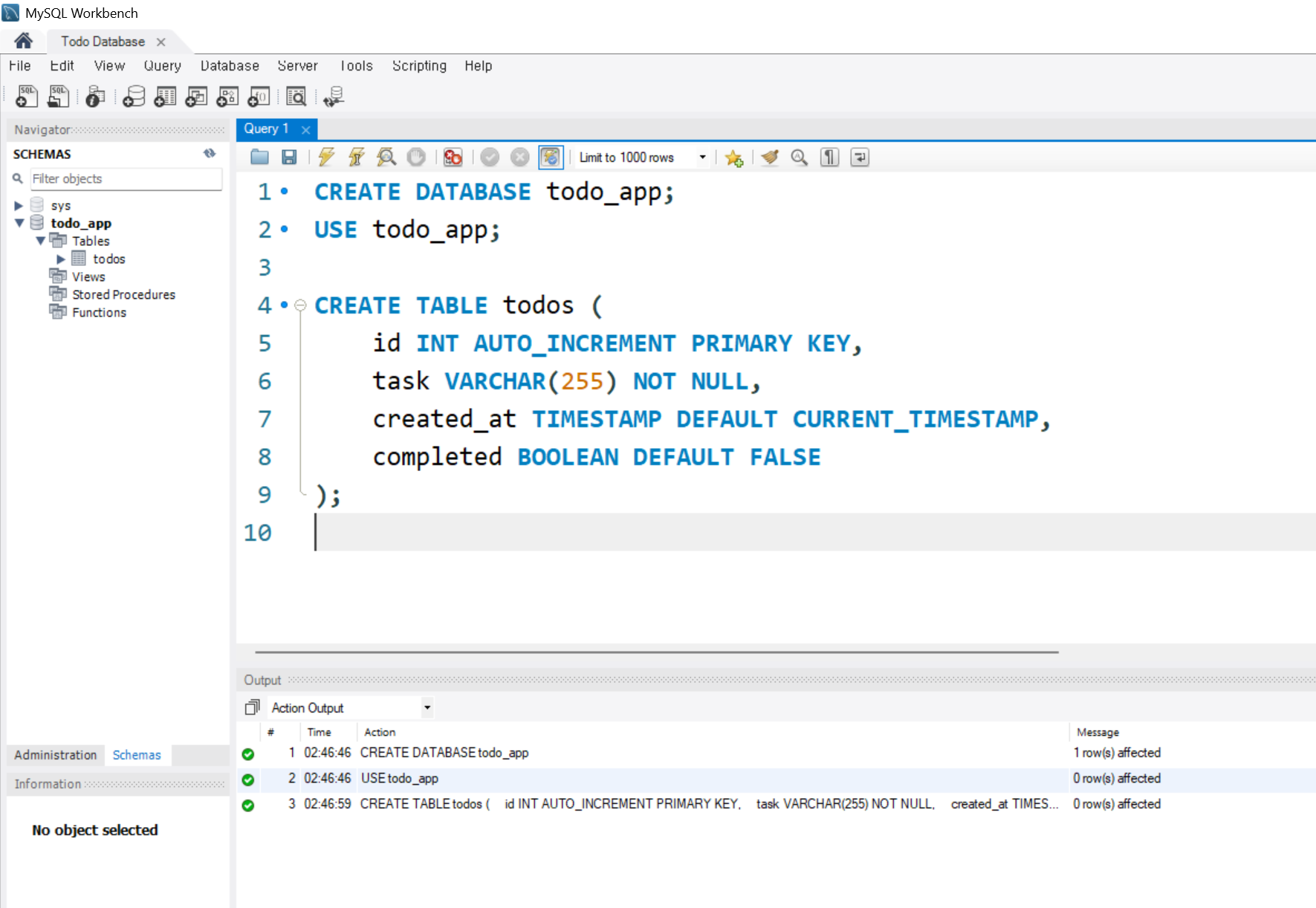
3) MySQL Workbench에서 아래 SQL문을 실행하여 데이터베이스와 테이블을 생성한다.
CREATE DATABASE todo_app;
USE todo_app;

CREATE TABLE todos (
    id INT AUTO_INCREMENT PRIMARY KEY,
    task VARCHAR(255) NOT NULL,
    created_at TIMESTAMP DEFAULT CURRENT_TIMESTAMP,
    completed BOOLEAN DEFAULT FALSE
);
⭐ MySQL과 연결 확인하기
1) 아래 코드를 작성하여 MySQL 데이터베이스와의 연결을 위한 기본 정보를 설정한다.
import streamlit as st
import mysql.connector
from mysql.connector import Error

# MySQL과 연결
def get_db_connection():
    return mysql.connector.connect(
        host = "[MySQL 엔드포인트 주소]",
        user = "[사용자 계정]",
        password = "[비밀번호]",
        database = "[데이터베이스명]",
        use_pure = True
    )

connection = get_db_connection()
print(connection)
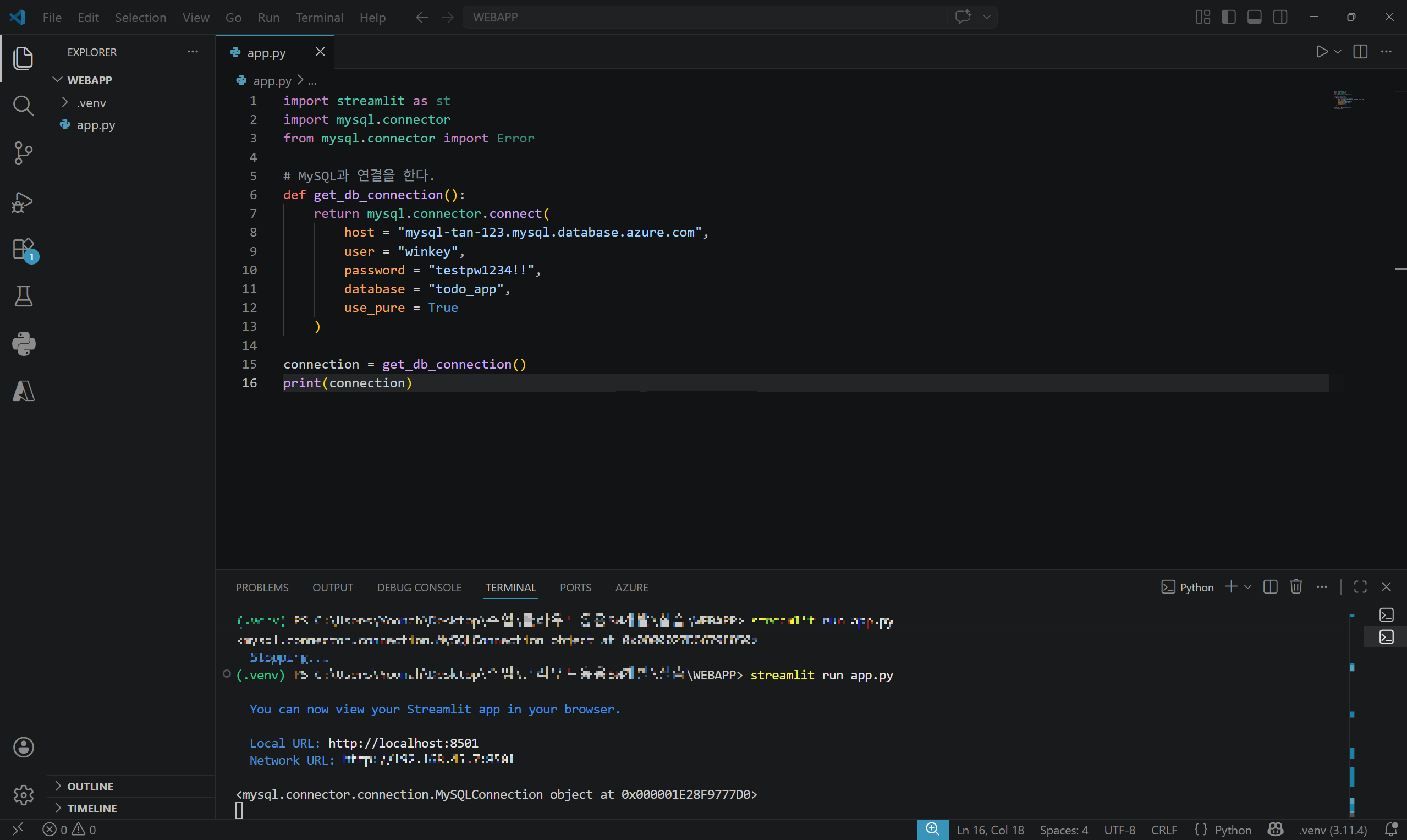
2) streamlit run app.py 명령어를 통해 애플리케이션을 실행한다. connection 객체가 정상적으로 생성되면 데이터베이스 연결이 성공한 것이다.
❕ RuntimeError: Failed raising error 오류 ❕
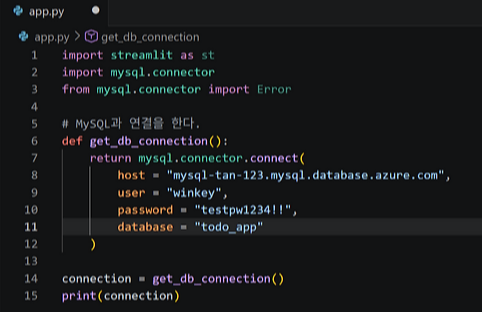
host, user, password, database만 작성하고 Streamlit 애플리케이션 실행했을 때 MySQL 연결 과정에서 사진과 같은 오류가 발생하였다. 이를 해결하기 위해 mysql.connector.connect() 함수에 use_pure=True 옵션을 추가하였다.
mysql-connector-python 라이브러리는 두 가지 방식의 연결 엔진을 제공하는데 기본값인 C Extension 방식 대신 Pure Python 방식으로 실행하기 위해 해당 옵션을 설정하였다.
❕ MySQL Connector 연결 방식 ❕
1) C Extension (기본값) 기본적으로 MySQL Connector는 C 언어로 구현된 엔진을 사용한다. 이 방식은 성능이 빠르다는 장점이 있지만, OS나 네트워크 환경에 영향을 많이 받아 일부 환경에서는 연결 오류가 발생할 수 있다.
2) Pure Python 방식 use_pure=True 옵션을 설정하면 MySQL Connector가 순수 Python 기반으로 동작하게 된다. 이 방식은 C Extension보다 속도는 느릴 수 있으나, Python 표준 라이브러리를 기반으로 동작하기 때문에 다양한 환경에서 높은 호환성을 가진다. 특히 IPv6 환경이나 복잡한 네트워크 환경에서도 안정적으로 연결이 가능하다는 장점이 있다.
에러:str(빨래하기), it must be of type list, tuple or dict 해결방안:task를 문자열 그대로 전달했기 때문에 발생한 오류이다. MySQL Connector에서 SQL문의 파라미터는 문자열 그대로 전달할 수 없으며, 리스트(list), 튜플(tuple), 딕셔너리(dict) 형태로 전달해야 한다.
2) 성공 메시지 출력 조건 수정
# 수정 전
def add_task(task):
    try:
    	...
    except Error as e:
        ...

if st.button("Add Task") and new_task:
    add_task(new_task)
    st.success(f"Task '{new_task}' added!")
# 수정 후
def add_task(task):
    try:
    	...
        return True

    except Error as e:
        ...
        return False

if st.button("Add Task") and new_task:
    if add_task(new_task):
        st.success(f"Task '{new_task}' added!")
에러:데이터베이스 저장 과정에서 오류가 발생하더라도 성공 메시지가 항상 출력된다. 해결방안:데이터가 정상적으로 추가된 경우에만 성공 메시지가 출력되도록 조건문을 추가하고, add_task() 함수가 성공 여부를 반환하도록 수정한다.
import streamlit as st
import mysql.connector
from mysql.connector import Error

# MySQL과 연결
def get_db_connection():
    return mysql.connector.connect(
        host = "[MySQL 엔드포인트 주소]",
        user = "[사용자 계정]",
        password = "[비밀번호]",
        database = "[데이터베이스명]",
        use_pure = True
    )

# Task를 저장하는 함수
def add_task(task):
    try:
        connection = get_db_connection()
        cursor = connection.cursor()
        query = "INSERT INTO todos(task) VALUES(%s)"
        cursor.execute(query, (task,))
        connection.commit()
        cursor.close()
        connection.close()
        return True

    except Error as e:
        st.error(f'Error: {e}')
        return False

connection = get_db_connection()

# User Interface
st.header("Welcome to Super Todo App", divider = "rainbow")

# 새로운 Todo 입력
new_task = st.text_input("New task")

if st.button("Add Task") and new_task:
    if add_task(new_task):
        st.success(f"Task '{new_task}' added!")
2) MySQL Workbench에서 SELECT 문을 실행하여 애플리케이션을 통해 입력된 데이터가 정상적으로 저장되었는지 확인한다.
SELECT * FROM todos;
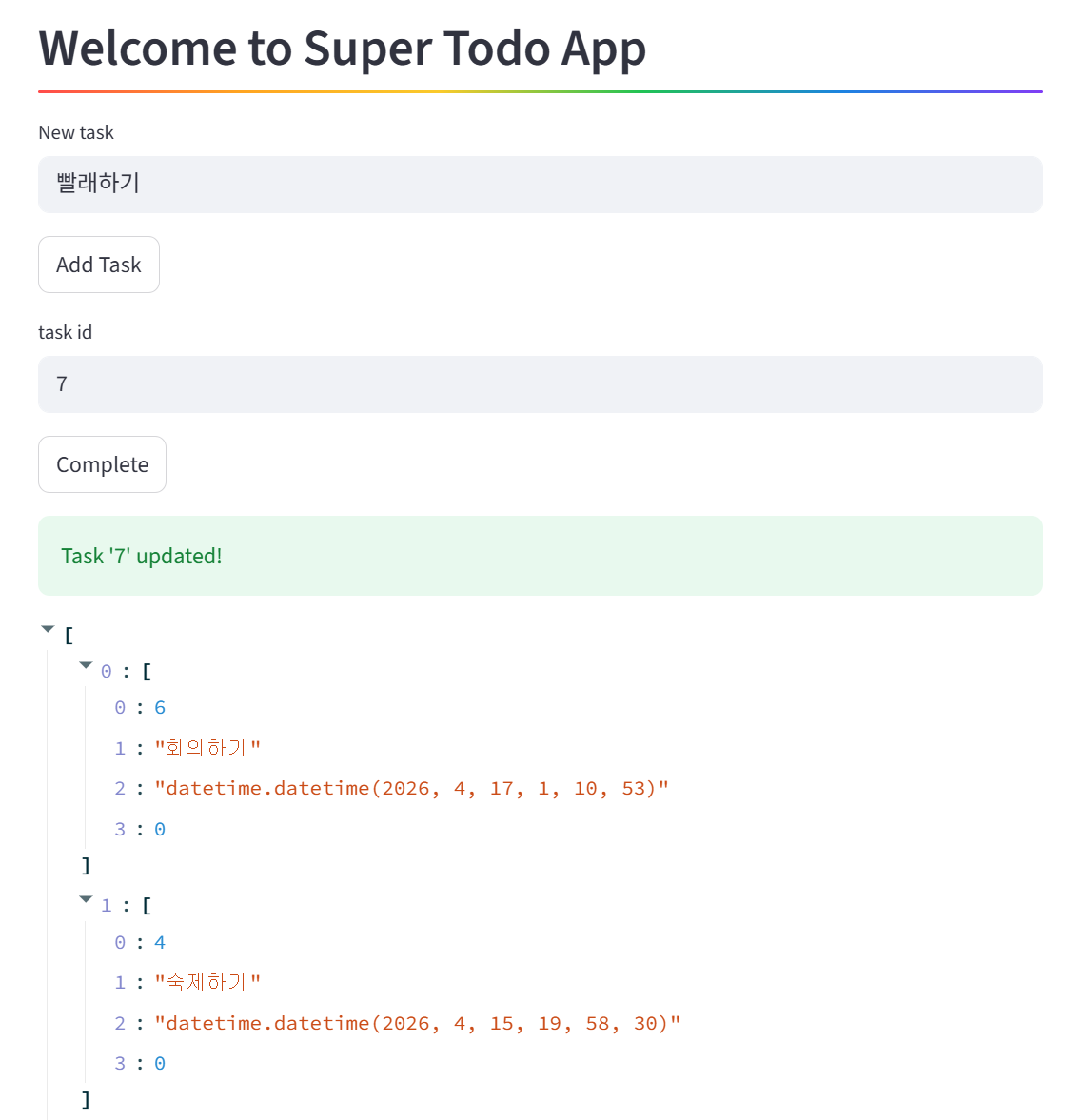
3) 나머지 기능을 추가하여 앱을 완성한다.
전체 기능
할 일 추가 (INSERT)
사용자가 입력한 새로운 Todo 데이터를 데이터베이스에 저장
할 일 조회 (SELECT)
완료되지 않은 할 일만 조회하여 리스트로 가져옴
생성 날짜 기준으로 최신순 정렬
할 일 완료 처리 (UPDATE)
특정 ID를 가진 할 일을 완료 상태로 변경
import streamlit as st
import mysql.connector
from mysql.connector import Error

# MySQL과 연결
def get_db_connection():
    return mysql.connector.connect(
        host = "[MySQL 엔드포인트 주소]",
        user = "[사용자 계정]",
        password = "[비밀번호]",
        database = "[데이터베이스명]",
        use_pure = True
    )

# Task를 저장하는 함수
def add_task(task):
    try:
        connection = get_db_connection()
        cursor = connection.cursor()
        query = "INSERT INTO todos(task) VALUES(%s)"
        cursor.execute(query, (task,))
        connection.commit()
        cursor.close()
        connection.close()
        return True

    except Error as e:
        st.error(f'Error: {e}')
        return False

connection = get_db_connection()

# Task 목록을 가져오는 함수
def get_task():
    try:
        connection = get_db_connection()
        cursor = connection.cursor()
        cursor.execute("SELECT * FROM todos WHERE completed = FALSE ORDER BY created_at DESC")
        tasks = cursor.fetchall()
        cursor.close()
        connection.close()
        return tasks

    except Error as e:
        st.error(f"Error: {e}")
        return []

# 작업을 완료하는 부분
def mark_task_completed(task_id):
    try:
        connection = get_db_connection()
        cursor = connection.cursor()
        query = "UPDATE todos SET completed = TRUE WHERE id = %s"
        cursor.execute(query, (task_id,))
        connection.commit()
        cursor.close()
        connection.close()
        return True

    except Error as e:
        st.error(f'Error: {e}')
        return False

# User Interface
st.header("Welcome to Super Todo App", divider = "rainbow")

# 새로운 Todo 입력
new_task = st.text_input("New task")

if st.button("Add Task") and new_task:
    if add_task(new_task):
        st.success(f"Task '{new_task}' added!")

# Task를 완료하는 부분
task_id = st.text_input("task id")

if st.button("Complete") and task_id:
    if mark_task_completed(task_id):
        st.success(f"Task '{task_id}' updated!")

tasks = get_task()

st.write(tasks)